Good day, runners! It’s time for the 2026 FLRC Challenge!

@steve-desmond and I are working hard on the technical backend for the Challenge, which has been more of, well, a challenge than in previous years. That’s because we’re doing lots of neat new stuff to make the experience better than ever:
- More fun: The primary goal of the Challenge is to be fun, so we’ve done two things to reduce the repetition and stress that some people felt in previous years. First, you can now get credit for running all 44 historical courses, so you won’t get bored with the 10 courses for the year. Second, the Challenge runs through November 15, so you have more time to
procrastinatecomplete your courses, and you can take advantage of the cool fall weather in those extra months. - More inclusive: If it were easy, it wouldn’t be a Challenge! That’s still true, but some of the longer or more heavily trafficked courses aren’t feasible for all runners, particularly children, and the limited choice inherent in 10 courses can conflict with focused training plans. To address these issues, we’re leaning into the Personal Challenge, so when you sign up, you can choose to claim your medal by running either the Classic Challenge format (the 10 courses I’ve chosen that go from 1 mile to the half marathon, split between road and trail) or a custom Personal Challenge, which lets you choose from as few or many of the 44 courses as you want.
- Simpler timing: Rather than having to scan QR codes or enter and edit times manually in the Webscorer app, you’ll now time yourself with your watch or phone and enter the time directly into that course’s results on the leaderboard. This approach should reduce accidental posts to the wrong course and eliminate the issue of no cell service preventing Webscorer from posting times.
- Cheaper and easier for FLRC: The new timing approach means we don’t need QR code signs for each course, which is good, since it would be too hard to erect 44 signs. Without physical signs, we save about $3500 in administrative costs and two days of my time putting up and taking down signs.
Registration is now open, along with ordering of this year’s snazzy FLRC Challenge shirt in blue on a cheerful yellow (in straight, fitted, racerback, and tank styles). If everything goes right, the leaderboard will start accepting times at 12:01 AM on April 18. I still have work to do updating the older course pages, but they should be usable.
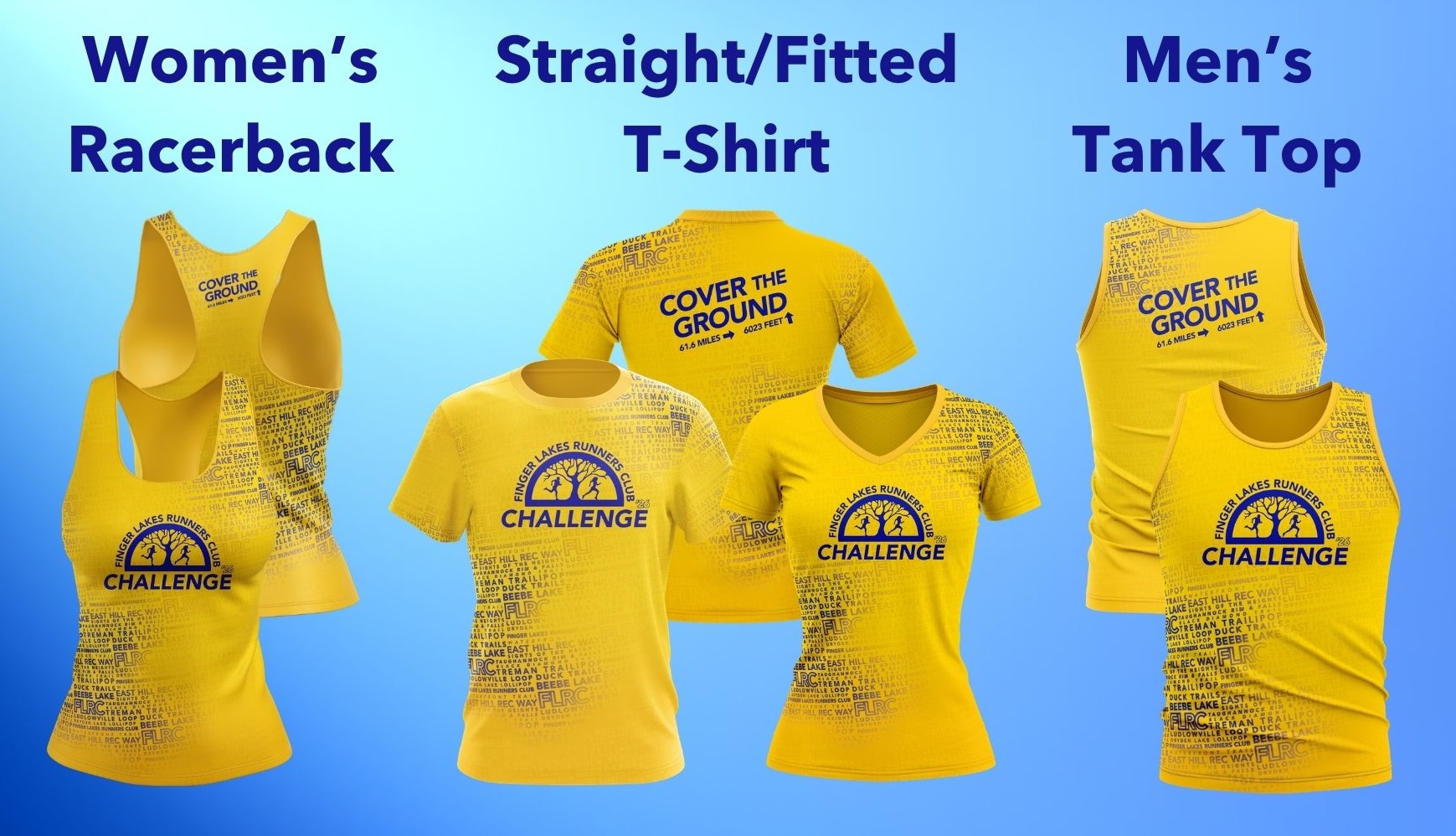
I can already hear the questions starting, so let me see if I can answer some of them here first.
Q: How does registration work?
As in previous years, you’ll sign up in Webscorer, but there won’t be a 10-course series to click through. Instead, once you’re done, you go to the leaderboard, where you’ll log in if necessary and then choose the courses you want to complete to claim your medal. Don’t stress about the choice; it will be possible to change your mind well before November 15.
Q: Do I have to have accounts on Webscorer and the FLRC Forum?
Yes. The leaderboard needs to know who you are when you submit times, so accounts are necessary. Rather than require everyone to set up yet another account, we’re piggybacking on the forum’s account management system. If you don’t have a forum account when you sign up, you’ll need to create one. If you use different addresses in Webscorer and on the forum, the leaderboard will ask you to log in to Webscorer to link the accounts.
Q: If I pick the Classic Challenge, can I also run the other 34 courses?
Absolutely! You’ll get credit (in certain competitions, see below) for running any of the 44 courses. The only thing that the choice of the Classic Challenge or Personal Challenge controls is what you must accomplish to claim your completion medal.
Q: Explain the Personal Challenge a bit more, please.
In the past, the Personal Challenge was a manually managed option offered to a few people—primarily kids—who couldn’t or shouldn’t meet the requirements of the full Challenge. The Personal Challenge has now been built into the leaderboard, so anyone can sign up for it for any reason. Pete Kresock’s Personal Challenge may be to run all the courses, whereas his 6-year-old twins may define their Personal Challenges as all the courses under 4 miles. Only three courses meet that criteria in the Classic Challenge set (which would have limited them in previous years), but when we bring back all the old courses, there are six more. Some people may want to run only road courses if they worry about tripping on trails, whereas others may stick to trail courses to avoid cars. There is no minimum number of courses for a Personal Challenge, so I could even imagine a toddler walking a single Sweet 1600 with their parent to claim a medal. But remember, the goal is to set yourself a real challenge, not figure out the lamest way to claim a medal.
Q: Can I change my mind about which courses I’m running during the year?
Eventually, yes, although we don’t have that feature live in the leaderboard yet. Remember, though, that the Challenge is supposed to give you a goal that’s non-trivial to meet. We hope people will change their Challenges for good reasons, such as deciding to make it harder, suffering a significant injury, or having to leave the area unexpectedly.
Q: How do the competitions intersect with the Personal Challenge?
By definition, competitions must operate within a common set of constraints shared among all competitors, so most of the Challenge competitions apply only to runs on this year’s Classic Challenge courses. Three competitions can include the Personal Challenge-only courses: Most Miles, which counts miles run on any course, Most Stars, which gives people credit for sharing their runs regardless of the course, and the new Most Courses competition. For instance, if you run Ellis Hollow Creek Crossings, which isn’t part of the Classic Challenge set, you’ll get miles for Most Miles, and if you post about it, a star for Most Stars, and it will count toward your Most Courses number. But that run won’t count toward Most Points, Age Grade, Team Points, or most other categories. For a full rundown of all competitions with cash prizes, see the Prizes page.
Q: What about the Most Runs Per Course competition? I want to win a sign!
Don’t worry! Even though we won’t have signs out in public, they’re such desirable prizes that I’ll make pristine signs for those who log the most runs on each of the Classic Challenge courses. Maybe I’ll design course sign stickers for the winners of the remaining courses.
Q: Without the signs, how do I know where to start?
On the page for each course, there’s a photo showing where the course sign was located in previous years, along with a Google Maps pin to the location. The brain teaser for you, once you’re in the right area, is to figure out where that sign used to be and start there.
Q: How will timing work without the signs?
It will be much like manual timing was in previous years for those who didn’t run with their phones. You will use a watch or phone to record your time while running, then load the course page in the leaderboard, click the green Add Result button, and enter your time. You’ll also be able to edit and even delete times if you make a mistake. The Timing page will have step-by-step instructions and screenshots shortly. As in the past, if you submit a surprising course-leading time or one that seems too fast, be prepared to back it up with a GPS track or Strava post.
Q: How does running a 5K race or a 1600m track effort work this year? Any other distances?
We are maintaining the one-to-one matching with remote runs and extending it to the 10K and half marathon. So, if you run 1600 meters on a track anywhere in the world, you can submit that as a Sweet 1600m (not East Hill Rec Way) effort, and if you run a 5K race or parkrun, you can submit that time to the Lakefront Loops (not Waterfront Trail) course. Starting this year, you can also submit 10K race efforts to our new Sights of the Heights course, and half marathon results can be submitted to the Freeville Fly-In course (not any other half marathon course). As before, the goal of allowing any 1600m or race to be submitted is to let people keep accumulating miles while traveling and encourage community through the posts. Since only the Sights of the Heights course is in the Classic Challenge set this year, the others are primarily useful for adding to Most Miles, Most Stars, and Most Courses.
Q: Are there any changes to the Ultra Challenges?
There’s only one small change to our Ultra Challenges. In the past, there was a requirement to use QR code scanning, but that’s no longer the case. You must still submit GPS support of your runs, generally a Strava post. As in previous years, the FLRC 100K Ultra Challenge encompasses all 10 courses in the Classic Challenge, and the Tough Trail Challenge and Tough Tarmac Challenge each take you to half of those courses. Of course, you can always run your own custom Ultra Challenge, but the leaderboard won’t be able to record it.
Q: Can I see how this year’s times compare to previous efforts on the old courses?
Yes! One of the cool things about the new leaderboard is that we have imported all the old results from previous years, so you can see what you did in the past.
Please feel free to ask any remaining questions, and I’m looking forward to seeing how our huge community game works out this year!